English
 Türkçe
 Deutsch
 Français
 العربية
 Русский
 Español
 Polski
Cyber Security and
Data Backup Under One Roof
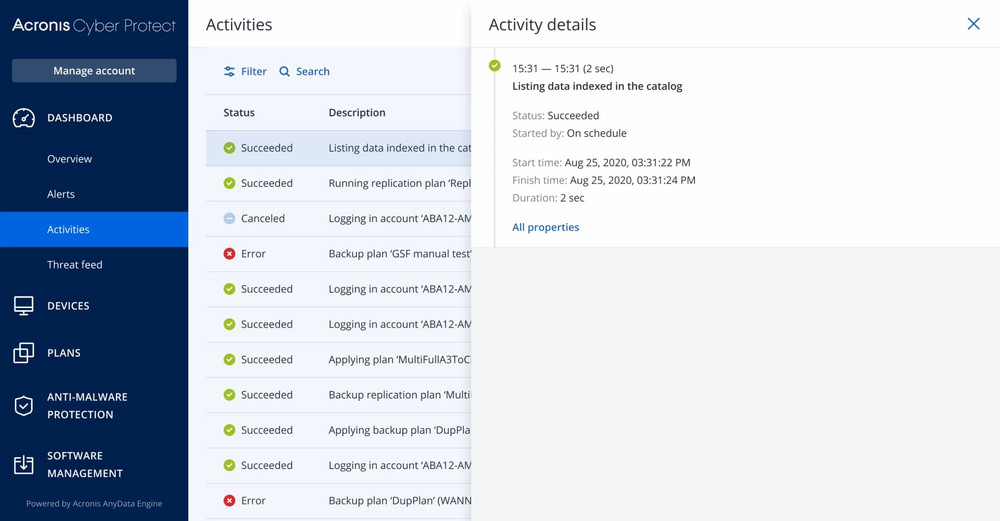
Acronis Cyber Protect Cloud integrates backup and cybersecurity It is the world's first platform.
Traditional backup software just copies your data — but ransomware attacks your backups What happens if it gets infected? Acronis, artificial intelligence supported antivirus, EDR (Endpoint Detection & Response), URL filtering And automatic patch management Stops threats before backup.
Physical server, virtual machine, cloud workloads, laptop, desktop and your mobile devices from a single console manage. Separate antivirus, separate backup, Stop purchasing separate DLP licenses.
Acronis Cyber Protect Cloud
Basic Abilities
Integrated cyber protection that keeps you one step ahead of your competitors
Hybrid Cloud Backup
Local, cloud and hybrid backup options. Reduce your RPO to minutes with disk image, file-level, and application-aware backup. Reduce your storage costs by up to 50% with incremental and deduplicated backup.
Artificial Intelligence Powered Anti-Malware
Detect zero-day threats, ransomware and cryptojacking attacks in real time with machine learning and behavioral analysis. Signature-based + heuristic + AI — three layers of protection.
EDR & XDR
Automatically detect, isolate and respond to suspicious activities with Endpoint Detection & Response. Go threat hunting with MITER ATT&CK framework mapping. Return systems to pre-attack state with one-click rollback.
DLP (Data Loss Prevention)
Prevent sensitive data from leaking through channels such as USB, email, cloud storage and printing. Automatic policy application with content review engine for KVKK, GDPR and ISO 27001 compliance.
Disaster Recovery (DRaaS)
Failover Acronis cloud infrastructure in seconds. Launch your entire recovery plan with one click with runbook automation. Protect your business continuity with RPO 15 minutes, RTO 15 minutes SLA guarantee.
Automatic Patch Management
Automatically distribute patches for Windows, macOS, Linux, and 300+ third-party applications. Automatic patching before backup, then secure snapshot chain.
Email Security
Advanced threat protection for Microsoft 365 and Google Workspace emails. Block Phishing, BEC (Business Email Compromise), malicious attachments and URLs with artificial intelligence.
AES-256 Encryption
AES-256 encryption in transport (TLS 1.3) and storage. Customer managed keys. Proof of data integrity with blockchain-based file verification (Acronis Notary).
URL Filtering & Device Control
Block access to harmful and policy-breaking websites. Manage connection policies for USB, Bluetooth and peripheral devices from the central console.
Microsoft 365, Google Workspace
SaaS Application Backup
You are responsible for your cloud applications' data — not the provider
Exchange Online
Full backup of emails, calendars, contacts and tasks. Restore a single item or the entire mailbox.
OneDrive & SharePoint
Protect files, folders, permissions and metadata. Granular restore, including site collections and document libraries.
Microsoft Teams
Backup of channel chats, files, Wiki pages and Teams settings. Maintain team structure and memberships.
Google Workspace
Backup of Gmail, Google Drive, Contacts, Calendar and Shared Drives. Cross-platform M365 ↔ Google pass-through support.
Acronis vs. competitors
Comprehensive comparison of backup and cybersecurity solutions
| Feature | Acronis Cyber Protect | Veeam Backup | nakivo | commvault | Carbonite |
|---|---|---|---|---|---|
| Built-in Antivirus/Anti-Malware | ✓ | ✗ | ✗ | ✗ | ✗ |
| EDR/XDR | ✓ | ✗ | ✗ | 3rd party integration | ✗ |
| DLP (Data Loss Prevention) | ✓ | ✗ | ✗ | ✗ | ✗ |
| Patch Management | ✓ | ✗ | ✗ | ✗ | ✗ |
| URL Filtering | ✓ | ✗ | ✗ | ✗ | ✗ |
| Email Security | ✓ | ✗ | ✗ | ✗ | ✗ |
| M365 & Google Workspace Backup | ✓ | ✓ | ✓ | ✓ | ✓ |
| Disaster Recovery (DRaaS) | ✓ | additional license | Annoyed | ✓ | ✗ |
| Blockchain File Verification | ✓ | ✗ | ✗ | ✗ | ✗ |
| Single Console (Backup + Security) | ✓ | ✗ | ✗ | Partial | ✗ |
| Price/Performance | ★★★★★ | ★★★ | ★★★★ | ★★ | ★★★ |
Acronis vs Veeam
Veeam is an excellent backup solution, but it lacks a security layer. You need to purchase separate products for antivirus, EDR, and patch management. Acronis offers all this in one license — reducing TCO by up to 40%.
Acronis vs Commvault
Commvault is powerful for large enterprise environments, but its high licensing cost and complex configuration make it challenging for SMBs. Acronis offers the same depth of protection with a much simpler interface.
Acronis vs Nakivo
Nakivo is an affordable option in the SMB segment, but it is missing advanced layers of protection such as DLP, EDR, email security and DRaaS. As we grow, Acronis' integrated platform differentiates itself.
Acronis Cyber Protect Cloud
Package Comparison
| Feature | Standard | Advanced Backup | Advanced Security | Security + EDR | Advanced DLP | Email Security |
|---|---|---|---|---|---|---|
| File & Disk Image Backup | ✓ | ✓ | ✓ | ✓ | ✓ | ✓ |
| M365 / Google Workspace Backup | ✗ | ✓ | ✗ | ✗ | ✗ | ✗ |
| CDP (Continuous Data Protection) | ✗ | ✓ | ✗ | ✗ | ✗ | ✗ |
| Anti-Malware & Ransomware | Basis | Basis | ✓ Developed | ✓ Developed | Basis | Basis |
| EDR/XDR | ✗ | ✗ | ✗ | ✓ | ✗ | ✗ |
| URL Filtering | Basis | Basis | ✓ Developed | ✓ Developed | Basis | Basis |
| Patch Management | ✗ | ✗ | ✓ | ✓ | ✗ | ✗ |
| DLP | ✗ | ✗ | ✗ | ✗ | ✓ | ✗ |
| Email Security | ✗ | ✗ | ✗ | ✗ | ✗ | ✓ |
| Disaster Recovery (DRaaS) | Can be purchased in addition to all packages | |||||
Supported Platforms
Operating Systems
- ✓ Windows Server 2008–2025
- ✓ Windows 10 / 11
- ✓ Linux (Ubuntu, CentOS, RHEL, Debian)
- ✓ macOS 12+ (Monterey–Sequoia)
Virtualization
- ✓ VMware vSphere/ESXi
- ✓ Microsoft Hyper-V
- ✓ Citrix XenServer
- ✓ KVM / Proxmox
- ✓ Virtuozzo
- ✓ Red Hat Virtualization
Cloud Platforms
- ✓ Microsoft Azure VM
- ✓ Amazon AWS EC2
- ✓ Google Cloud Platform
- ✓ Microsoft 365
- ✓ Google Workspace
Applications
- ✓ Microsoft SQL Server
- ✓ Microsoft Exchange
- ✓ Active Directory
- ✓ Oracle Database
- ✓ MySQL / MariaDB
- ✓ SAP HANA
Acronis Managed Service
Provider Your partner
cloudspark, Acronis #CyberFit MSP Program authorized within the scope Managed Service Provider. This means we are not a single license vendor, but rather Customers who run the Acronis infrastructure in our own data center manage their environments 24/7 and have received Acronis' highest level technical training serving with a team It means we are a business partner.
In the MSP model, you do not purchase software licenses or establish infrastructure. Cloudspark operates the entire Acronis platform on your behalf — from backup policies We manage everything from safety rules, EDR alert triage to disaster recovery. You just know that you are protected.
What Does MSP Model Mean?
Buy a license → Install it yourself → Manage it yourself → Call support in case of problems → Risk of forgetting to update
Cloudspark manages everything → Licensing, installation, monitoring, updating, alert management, incident response, reporting — all from one source, flat monthly fee
MSP Service Life Cycle
End-to-end management from initial needs analysis to continuous optimization
Discovery & Analysis
Existing infrastructure, workloads and risk assessment
Design
Backup policies, RPO/RTO targets, security rules
Setup
Agent deployment, policy enforcement, initial full backup
24/7 Monitoring
Proactive alert management, anomaly detection, SLA tracking
Reporting
Monthly performance report, recommendations, capacity planning
What is MSP? We provide?
Fully Managed Backup
Creating, planning, monitoring and troubleshooting backup policies are entirely the responsibility of the Cloudspark team. Failed backups are automatically retriggered, without your intervention.
Security Operations Center
EDR/XDR alerts, malware detections and security events are monitored 24/7 by the Cloudspark SOC team. Critical alerts are triaged and intervention is initiated within an average of 15 minutes.
Patch & Update Management
Verification of operating system and application patches in the test environment, management of the approval process and scheduled distribution. Rapid response to zero-day vulnerabilities.
Disaster Recovery Exercise
Realistic DR exercise at least 2 times a year. Updating runbooks, verifying and reporting RTO/RPO targets. In real disaster situations, planning comes into play instead of panic.
Cost Optimization
Detection of unnecessary backup copies, storage tiering recommendations, return of unused licenses. With the MSP model, you only pay for what you use — fixed monthly budget, no surprises.
M365 & SaaS Protection
Configuring, monitoring and periodically performing restore tests of Exchange, OneDrive, SharePoint, Teams and Google Workspace backup.
DLP & Compliance Management
Defining sensitive data classification rules, preventing data leakage via USB/printing/email. KVKK, GDPR, ISO 27001 compliance reporting.
Email Security
Advanced anti-spam, anti-phishing, URL sandbox and attachment scanning. AI-based protection against business email fraud (BEC). Quarantine management and user notifications.
Detailed Monthly Reporting
Executive report containing backup success rates, amount of data recovered, security incident summary, storage trend, patch compliance status and actionable recommendations for the next period.
Why On Your Own?
not too with MSP?
Purchasing licenses, installing, configuring, updating, monitoring, troubleshooting — all are the responsibility of your IT team. Additional workload of 15-25 hours per week, depending on team size.
Single point of responsibility. Licensing, installation, configuration, 24/7 monitoring, alert management, updates, reporting — everything is in Cloudspark. Let your IT team focus on strategic projects.
Frequently asked
Questions